Basic Concept
The InteractionFree protocol involves two main roles, the Broker and the Workers. A network consists of one and only one Broker, and several Workers. The Broker stands for a central coordinator that connects all the Workers, constructing a star-type network. A Worker can have a unique name that can be addressed by other Workers (also called Service), or anonymous (also called Client).
Just like a normal server-client mode, the Service provides certain service, and the Client consumes the service. The only difference is that the Client does not need to know the address of the Service, or access the Service directly. They just need to know the Broker address and the unique name of the Service, and the Broker will take care of the rest. A typical topological diagram is shown in the figure below.
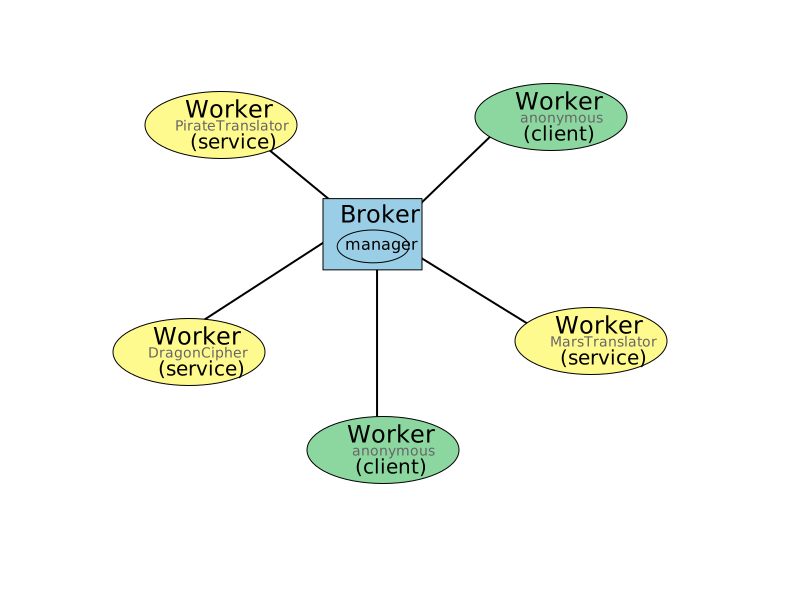
Here, the yellow circle presents the named Worker (Service), and the green circles present the anonymous Workers (Clients).
The major method of using this protocol is constructing an instance of IFWorker, connecting to the Broker, and then making designed function calls on the IFWorker object.
1worker.ServiceName.functionName(args)
worker is the instance of IFWorker.
ServiceName is just like a member of worker, and functionName is just like a method of worker.ServiceName.
For example, if a Service named DragonCipher provides a function encrypt_to_dragon_speech, the call would be like this:
1worker.DragonCipher.encrypt_to_dragon_speech(humam_speech)
When any Worker makes the above invocation, it is actually the function in the Service DragonCipher that is executed.
There are also several functions provided by the IFBroker (actually by the Manager of the Broker).
Calling these functions is similar to calling the functions of a Worker, except that the ServiceName is emitted, as follows,
1worker.functionName(args)
The functions available in the Broker are listed in the API documentation Manager.
Please note that, when invoking the function of Manager through the protocol, the parameter sourcePoint will be automatically passed, you do not need to pass it manually.
The Manager can also be customized by the user.
See more detailed information in Customizing the Manager.